AppDashboard
Entra ID Tenant Security at a Glance
A single pane of glass into every Microsoft Entra™ ID app registration across your tenant — without ever modifying tenant data. From security scoring and attack-surface mapping to credential health and permission risk analysis, turn raw Graph API data into actionable insight in minutes, not hours.
Without AppDashboard:
- Run ad-hoc Graph API queries, export to CSV, build formulas in Excel — hours of work to answer a simple tenant question
- No visibility into expiring credentials until an app breaks in production
- Permission risk and over-privileged apps discovered reactively — after incidents, not before
- No single view of attack surface — risky apps, stale registrations, and broad permissions scattered across portal menus
With AppDashboard:
- Instant tenant-wide overview — security scorecard, credential health, and permission risks in one dashboard
- Expiring secrets and certificates surfaced proactively before they cause outages
- Permission risk analysis highlights over-privileged apps and high-impact service principals at a glance
- 100% read-only — full visibility with zero write permissions, no infrastructure required
Why AppDashboard?
Security teams, IT managers, and tenant administrators need a fast, comprehensive view of what's registered in their Entra tenant — without juggling raw Graph API queries, portal menus, or manual spreadsheets. AppDashboard delivers that visibility instantly, with zero write permissions required — Application Security Posture Management (ASPM) for your Microsoft Entra™ ID app registrations.
100% Read-Only
Uses only Application.Read.All and User.ReadBasic.All delegated permissions. Never creates, updates, or deletes any tenant data.
Zero Infrastructure
Deploys as a static web app. All analysis runs client-side in the browser — no tenant data reaches our servers.
Click-to-Filter
Every metric card is interactive. Click to instantly filter the table and drill into exactly the apps you care about.
CSV Export Everywhere
Every view supports one-click CSV export for audits, compliance reviews, and governance reporting.
Who Is AppDashboard For?
IT Managers
Executive-level health scorecards, at-risk app counts, creation trends, and exportable reports for governance reviews.
Security Teams
Per-app security scores, attack vector mapping, high-risk permission inventories, and implicit-grant detection.
IT Admins
Credential expiry tracking, service principal monitoring, redirect URI hygiene checks, and direct Azure Portal links for remediation.
Tenant Managers
Full app registration inventory, ownership gaps, audience exposure analysis, and multi-tenant app visibility.
Eight Analytical Dashboards
Everything you need to understand, audit, and act on your Entra ID app landscape — from instant alerts to deep tenant-wide analytics.
1. Alerts Overview
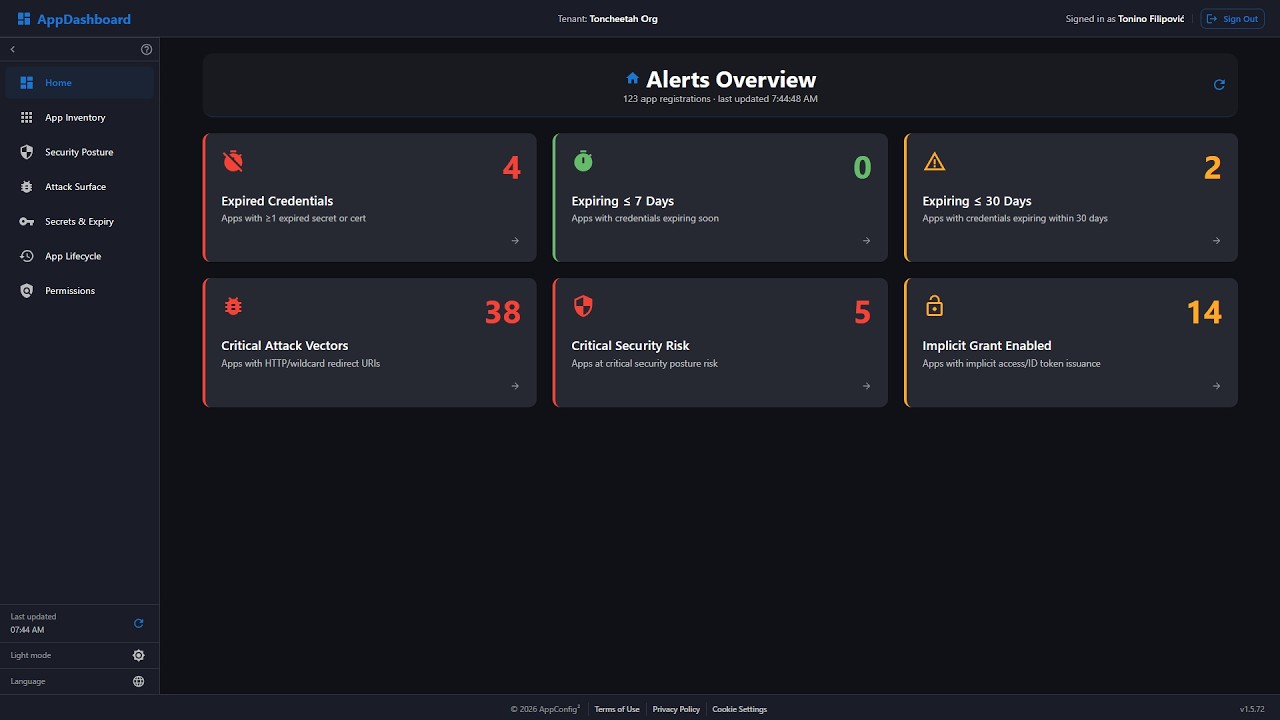
The new landing dashboard highlights urgent tenant risks the moment you sign in.
- 6 Action KPI Cards — no valid credentials, expiring ≤ 7 days, expiring ≤ 30 days, critical attack vectors, critical security risk apps, and implicit grant enabled apps
- Built for immediate triage and incident prevention
- Click any alert card to open the relevant filtered dashboard view directly
- Purpose-built to surface urgent issues before outages or security events
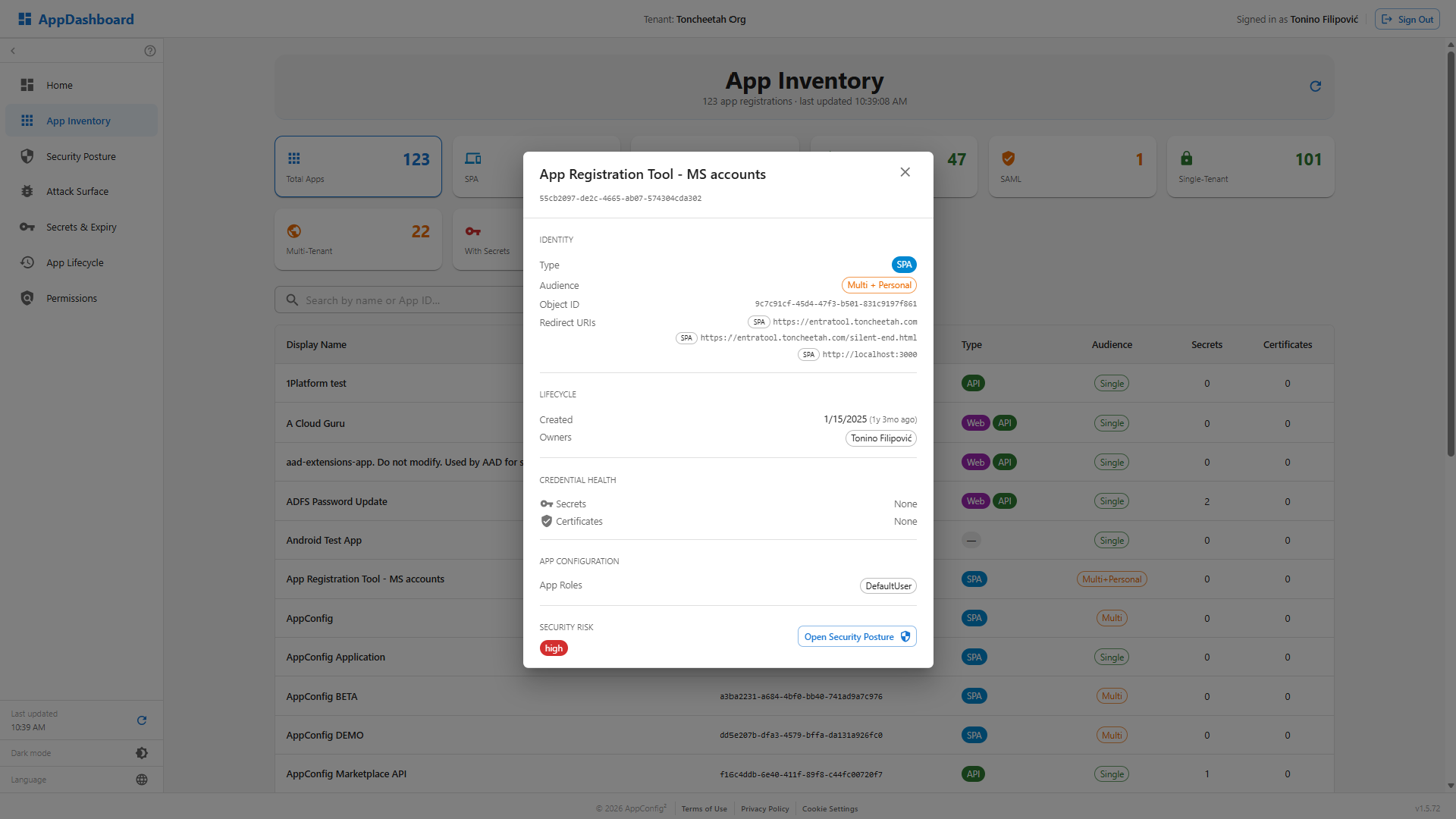
2. App Inventory
A dedicated inventory view focused on complete application visibility.
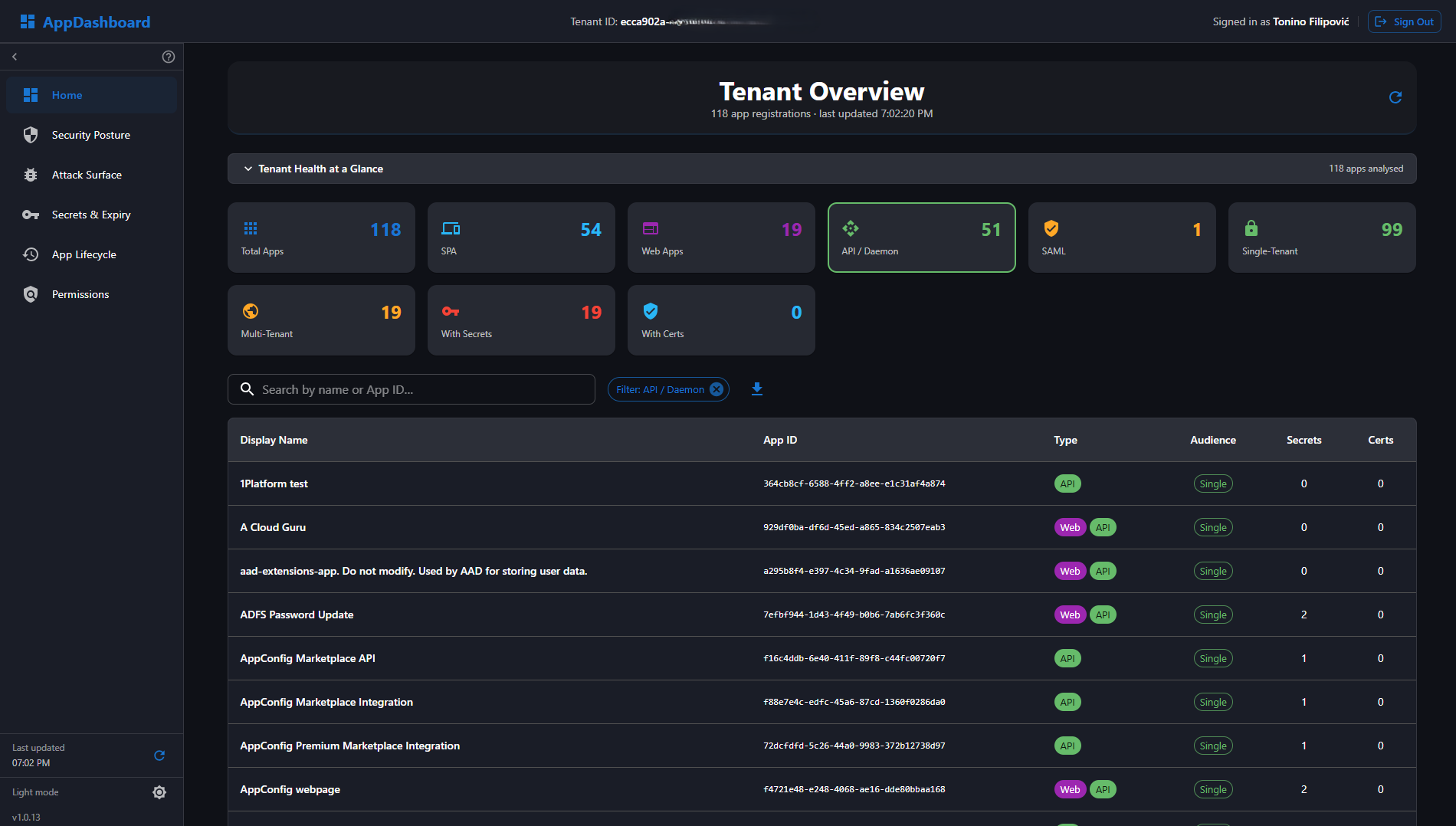
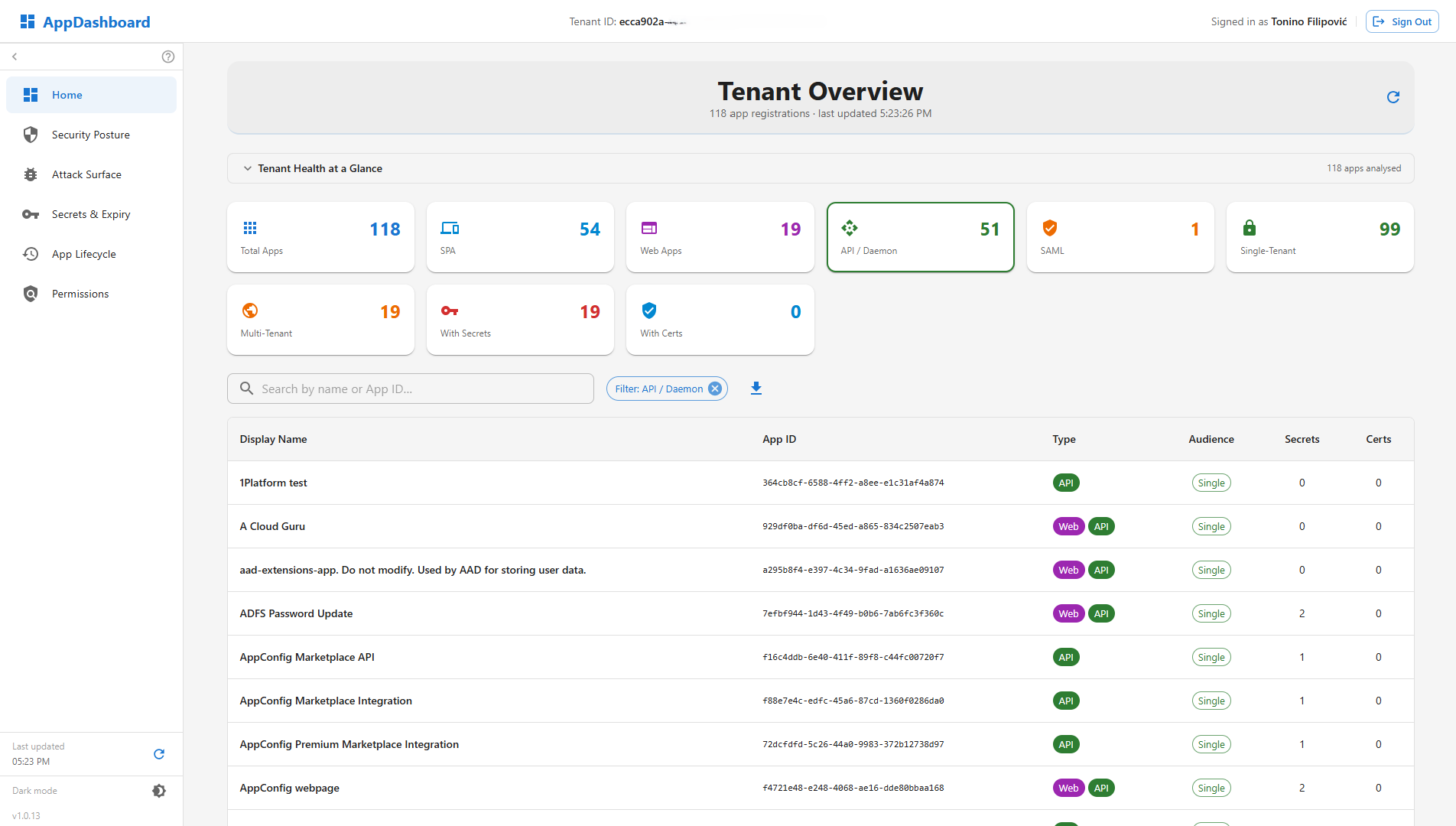
- 9 Metric Cards — Total, SPA, Web Apps, API/Daemon, SAML, Single-Tenant, Multi-Tenant, With Secrets, With Certificates — plus an Agent Blueprints card when your tenant has any
- App Detail Panel — click any row to open a slide-over with Identity (type, audience, Object ID), Lifecycle (creation date with relative age, owners), Credential Health (secrets & certificates), and Security Risk with a direct link to Security Posture
- Searchable paginated table with display name, App ID, type, audience, credential counts
- Click any metric card to instantly filter the app list below
- One-click CSV export of the filtered app list
3. Security Posture
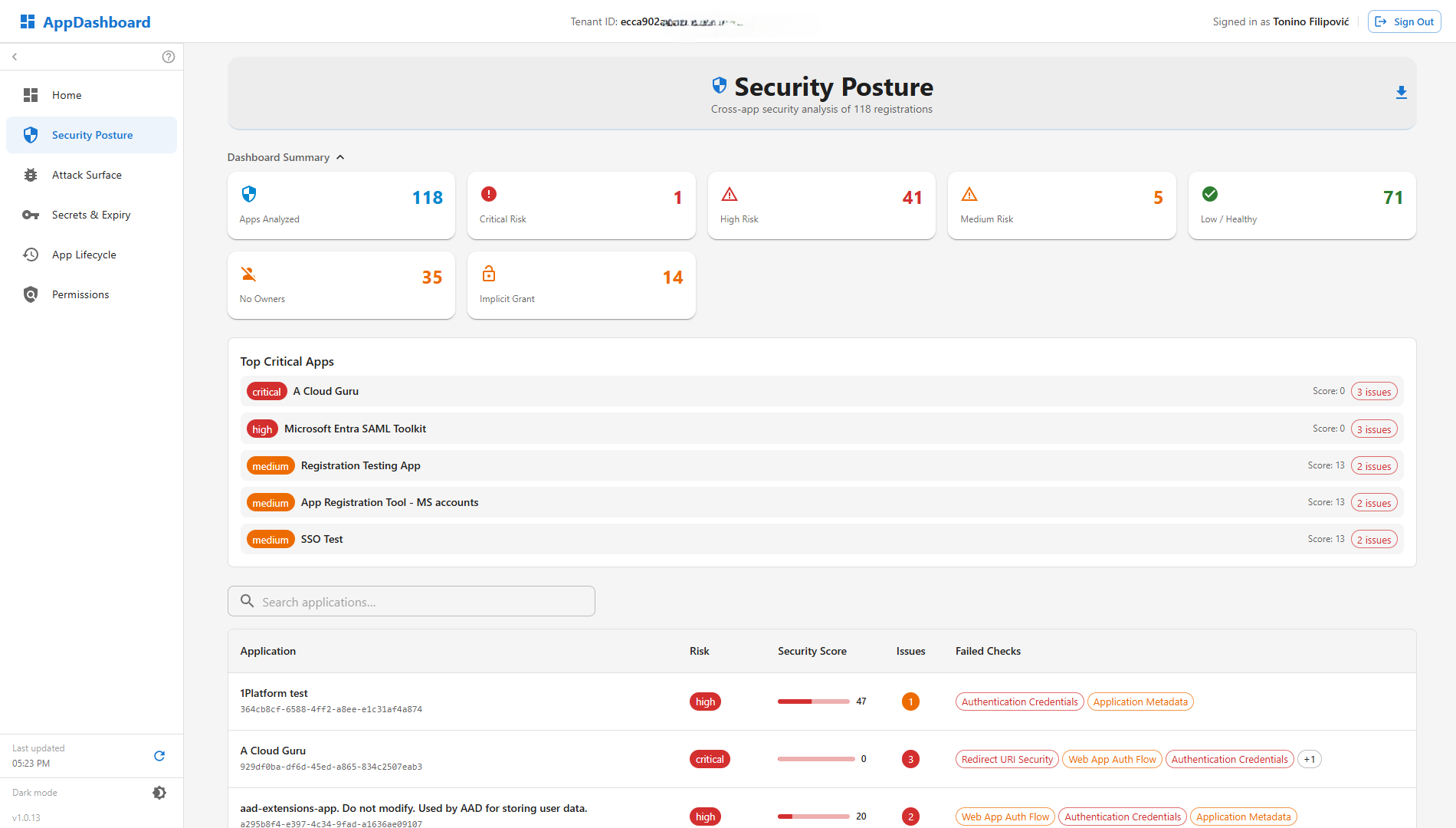
Cross-app security analysis — every app receives a 0–100 security score and a risk tier.
- Scoring Engine — evaluates redirect URI hygiene, implicit flow, sign-in audience, and permission risk
- Risk Tiers — Critical, High, Medium, Low/Healthy, Not Assessed
- 8 metric cards including Expired Credentials and Implicit Grant detection
- Recently rebalanced — scores now reflect genuine findings, not routine checks nearly every app passes by default
- Top 10 Critical Apps panel for immediate attention
- Per-app security report: every check as pass/fail with impact description and recommendation
- CSV export of risk, score, issue count, and failed checks
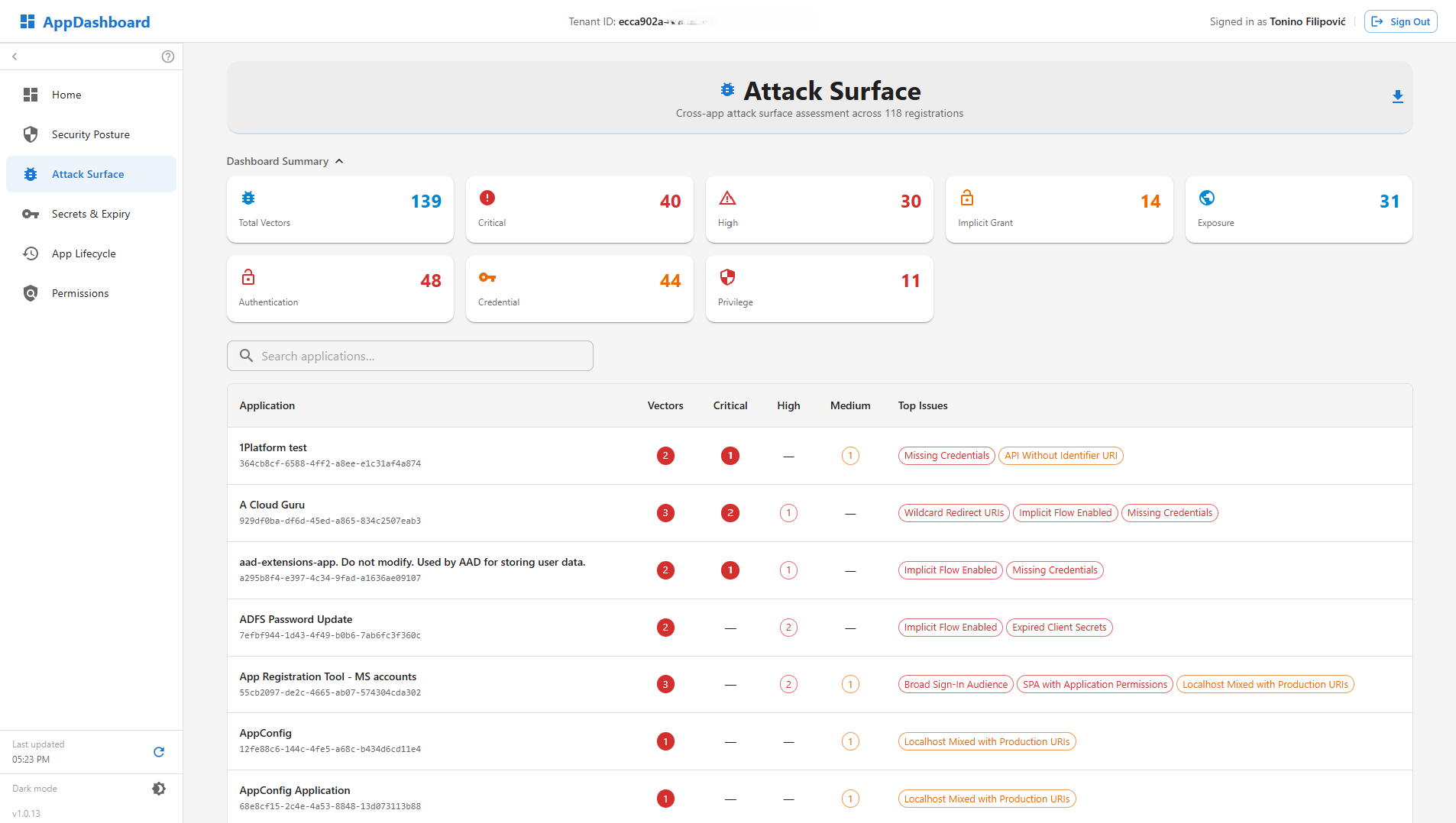
4. Attack Surface
Maps concrete attack vectors across four categories — answers "Where could an attacker get in?"
- Authentication — insecure HTTP redirects, wildcard URIs, implicit flow, localhost in production, apps accepting externally mapped token claims
- Credential — broad sign-in audience, expired secrets, missing credentials on confidential apps
- Privilege — excessive permissions (> 20), SPA apps with application-level roles
- Exposure — APIs without Identifier URI, preauthorized apps bypassing consent, dangling-subdomain takeover risk (redirect URIs pointing at ephemeral cloud hostnames)
- Severity levels: Critical, High, Medium, Low — with per-app vector detail dialog and CSV export
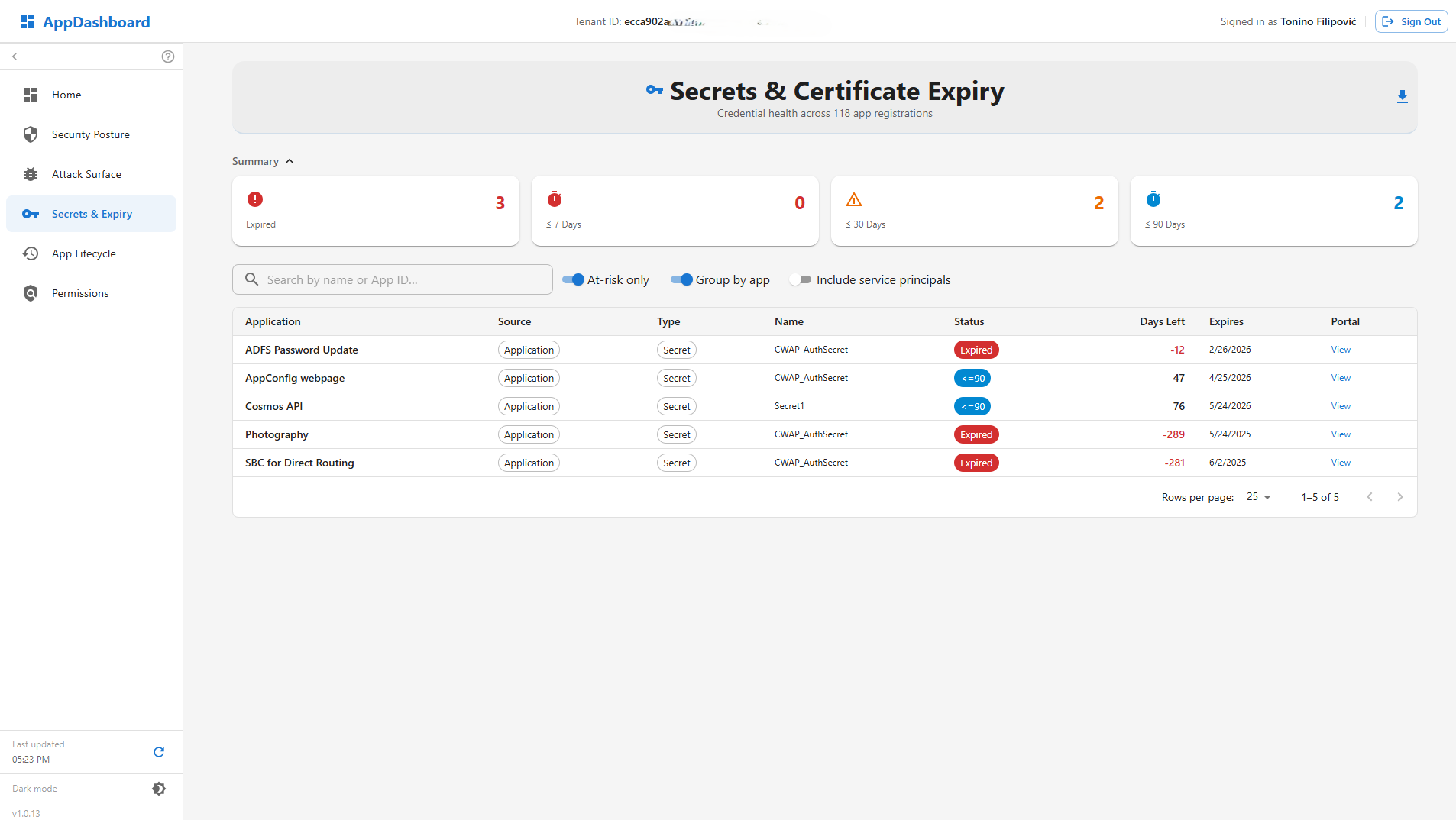
5. Secrets & Expiry
Credential lifecycle management — tracks every client secret and certificate across the tenant.
- Expiry Buckets — Expired, ≤ 7 days, ≤ 30 days, ≤ 90 days, Healthy
- Smart filters — at-risk only (default), group by app, include service principal credentials, include App Proxy custom-domain certificates
- Credential Lifetime Flags — secrets over a year old or certificates over two years old are flagged even when not yet close to expiring
- Detailed table: Application, Source (Application / Service Principal / App Proxy), Type (Secret vs. Certificate), Status chip, Days Left, Lifetime, Expiry date
- Direct Azure Portal link per credential for quick remediation
- CSV export of all credential records
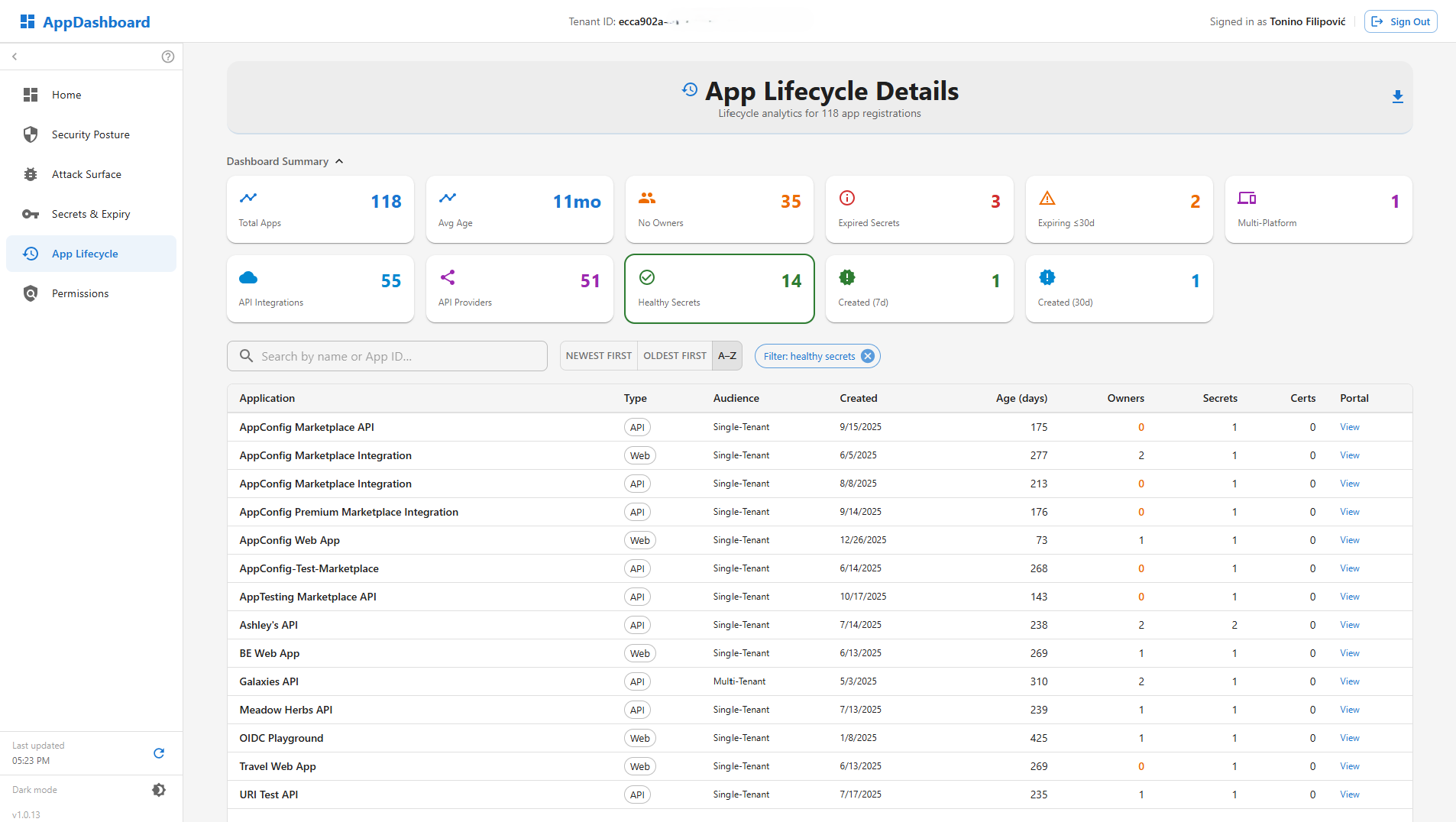
6. App Lifecycle
Age distribution, creation trends, ownership analysis, and credential health visualizations.
- 11 Metric Cards — Total Apps, Avg Age, No Owners, Expired Secrets, Expiring ≤ 30d, Multi-Platform, API Integrations, API Providers, Healthy Secrets, Created (7d), Created (30d)
- 5 Visual Panels — age distribution, monthly creation trend, credential health bars, sign-in audience breakdown, application type breakdown
- Per-app detail dialog with created date, age, type, owners, credentials, redirect URIs
- CSV export
7. Permission Inventory
Full OAuth2 and app-role permission catalog — answers "Who has access to what, and how dangerous is it?"
- Two View Modes — by Permission (unique permissions across tenant) and by App (per-app permission profile)
- Risk Classification — Critical, High, Medium, Low per permission, powered by a built-in known-permissions catalog
- 6 summary metrics: Unique Permissions, Critical + High Risk, Application Perms, Delegated Perms, Apps With Permissions, Apps With High Risk
- Drill-down dialogs: per-permission description, risk chip, resource, and consuming apps
- Per-app: every permission as a color-coded chip
- Custom API grouping with Entra portal links for unknown resources
- CSV export adapts to current view mode
8. Posture Report
One print-ready assessment for the auditor — no more merging five CSV exports by hand.
- Single Consolidated Document — executive summary, risk distribution, and top findings in one view
- Full application appendix drawing on data from every other dashboard
- Print-ready formatting — hand it directly to an auditor or compliance reviewer
- Replaces manually merging five separate CSV exports into one report
- Combined CSV export, one row per application, including an Agent Blueprint column
Security-First Design
AppDashboard is a read-only analytics tool. It queries your tenant exclusively through Microsoft Graph with delegated read permissions — no configuration changes, no side effects, and no tenant data reaches our servers.
Authentication
- MSAL PKCE — no implicit flow, no client secrets in the browser
- Tenant-gated sign-in — only approved tenants are admitted; the single-tenant edition is pinned to your tenant alone
- sessionStorage token cache — sign-in tokens isolated per browser tab
Read-Only by Design
- No write permissions requested — only read scopes are consented
- No configuration changes — AppDashboard never modifies your tenant
- No client-side secret storage
Data Residency
- Hosted on Azure Static Web Apps — no backend server processing your data
- Graph is called directly from your browser — no tenant data reaches our servers
- No telemetry or third-party analytics beyond what Azure SWA platform collects
See AppDashboard in Action
Watch the promo video, then browse screenshots of every view
Screenshots — click to enlarge


How AppDashboard Fits the Suite
AppDashboard complements the suite with tenant-wide, read-only analytics and security visibility across all app registrations.
| Dimension | AppConfig | AppTesting | AppDashboard | AppTooling |
|---|---|---|---|---|
| Write capable? | — | — | ||
| Tenant-wide analytics & security scoring | — | — | — | |
| Alerts overview for urgent tenant risk | — | — | — | |
| Attack surface mapping across all apps | — | — | — | |
| Credential expiry monitoring across tenant | — | — | — | |
| Permission risk inventory across tenant | — | — | — | |
| Authentication flow testing | — | — | ||
| Graph Explorer | — | |||
| App configuration changes (redirect URI, roles, claims) | — | — | ||
| Backup & Restore before write operations | — | — |
AppDashboard vs. Microsoft Security Tools
Already running Microsoft Defender for Cloud Apps or App Governance? AppDashboard isn't a replacement — it covers a different layer.
AppDashboard secures the application registration layer — how an app is configured before it ever runs. Microsoft Defender for Cloud Apps and App Governance secure application activity after deployment — what an app does once it's live. Most organizations need both.
| Capability | AppDashboard | Defender for Cloud Apps / App Governance |
|---|---|---|
| App registration inventory & search | Limited | |
| Credential (secret/certificate) expiry monitoring | — | |
| Declared permission risk analysis (app manifest)* | — | |
| Attack surface mapping (auth config, redirect URIs, exposure) | Limited | |
| Security posture scoring | Limited | |
| Ownership gap detection | — | |
| Application lifecycle analytics | — | |
| Consented OAuth grant & anomaly detection | — | |
| Runtime / sign-in behavior monitoring | — | |
| OAuth consent abuse & compromised-app detection | — | |
| Active incident investigation | — |
*Permission risk is evaluated from each app's requested (manifest-declared) permissions, not live consent grants.
Available Now — Choose Your Edition
AppDashboard is live today as a multi-tenant SaaS app you can subscribe to immediately, or purchase directly through the Azure Marketplace with native Azure billing. Prefer a dedicated deployment in your own tenant? A single-tenant edition is available on request.
Multi-Tenant SaaS
Your data stays in your Entra ID tenant — sign in with Microsoft and start in minutes
Single-Tenant Edition
Dedicated build deployed inside your own tenant — contact us for pricing
Azure Marketplace
Available now — native Azure billing alongside AppConfig & AppTesting. View listing →
Professional Support
Dedicated technical support and documentation with every edition
AppDashboard
€79 on a 2-year contract · €89 / month on a 1-year contract
- Full access to all dashboard analytics
- Professional technical support
- Enterprise-grade security and compliance
- No setup fees or commitments
Need a dedicated single-tenant build?
Contact Us for Pricing Also available via Azure Marketplace with native Azure billingQuestions About AppDashboard?
Want to learn more about tenant analytics capabilities? Get in touch with our team.