AppTooling
Ten Entra ID Admin Tools. One Unified SPA.
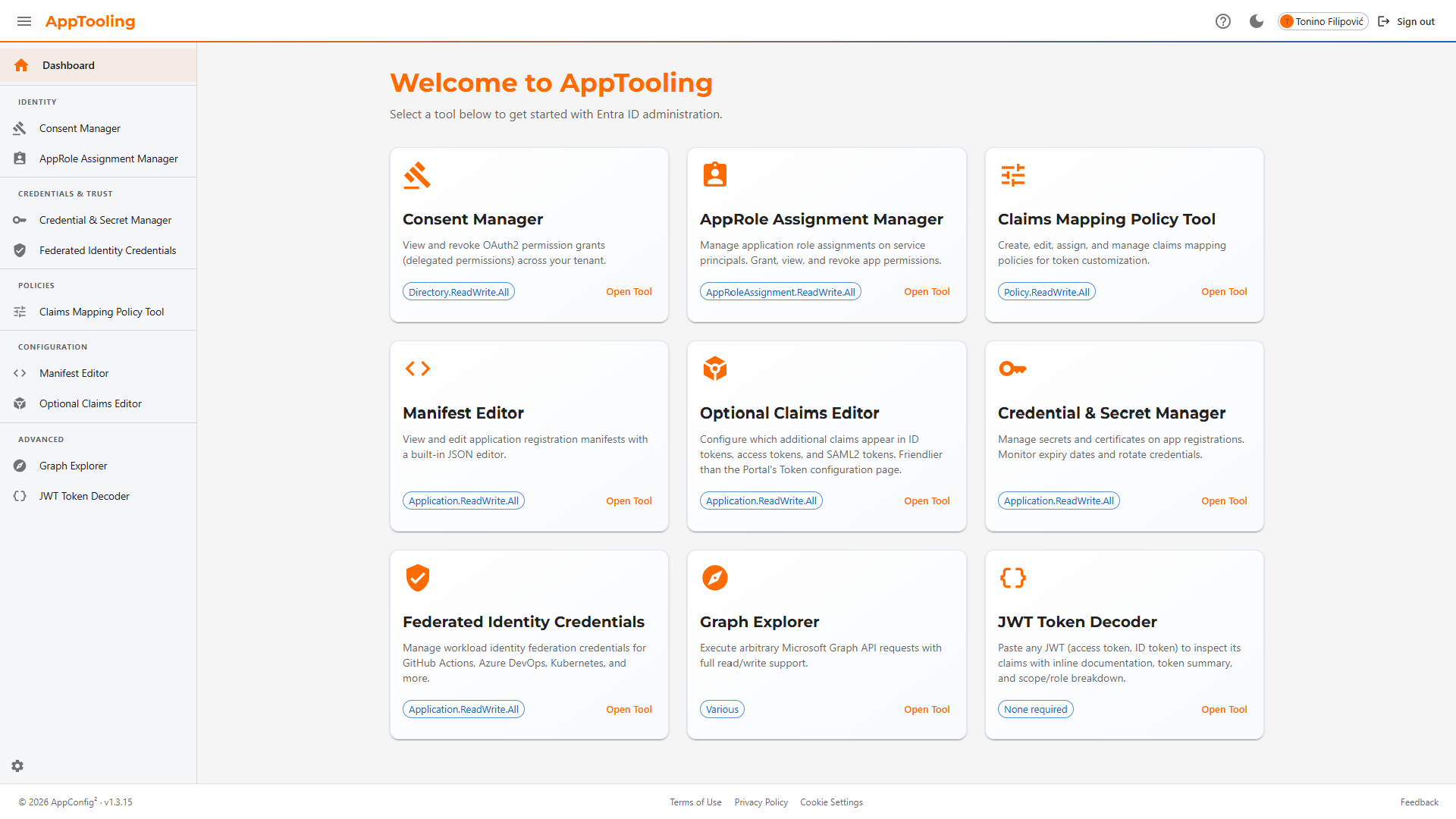
Ten focused Entra ID management tools in a unified SPA. Fills the operational gap between the Azure Portal's form-based UI and scripted automation — for privileged tasks that are too complex for Portal forms yet too infrequent to justify bespoke scripts.
Without AppTooling:
- Stale OAuth consent grants and over-privileged service principal assignments cleaned up through PowerShell scripts or direct Microsoft Graph API calls
- Claims mapping policies written and deployed through complex PowerShell scripts — no visual feedback, no validation, and no easy way to test the output
- Consent, role assignments, credentials, federation, claims policies, and manifests managed across multiple disconnected Portal blades, PowerShell modules, and Graph Explorer tabs — no unified workflow
With AppTooling:
- Consent Manager surfaces all OAuth grants and admin consents across the tenant — stale or over-privileged grants revoked directly in the UI, no PowerShell or Graph Explorer needed
- Claims mapping policies built through a guided UI — no PowerShell required, schema validated on every save, instantly testable in the same interface
- Ten purpose-built tools covering consent, roles, credentials, federation, claims, manifests, JWT decoding, and backup — all in one SPA
Why AppTooling?
The Azure Portal is great for one-off changes through its UI, and PowerShell/CLI scripts are ideal for fully automated pipelines. AppTooling targets the gap in between: privileged, interactive Entra ID administration tasks that require judgment and confirmation — performed through a purpose-built interface with guardrails built in.
No Portal Context-Switching
Consent cleanup, role assignments, and credential rotation — all in one interface instead of navigating across multiple Portal blades.
Confirmation on Every Write
Every DELETE, PATCH, and POST operation requires explicit confirmation. Mistakes are surfaced before they happen, not after.
Guided Operations
Templates for workload identity federation, a curated optional claims catalog, and built-in schema validation eliminate error-prone manual JSON editing.
Ten Focused Tools
Organised into four functional areas covering the full scope of Entra ID application administration.
Consent Manager
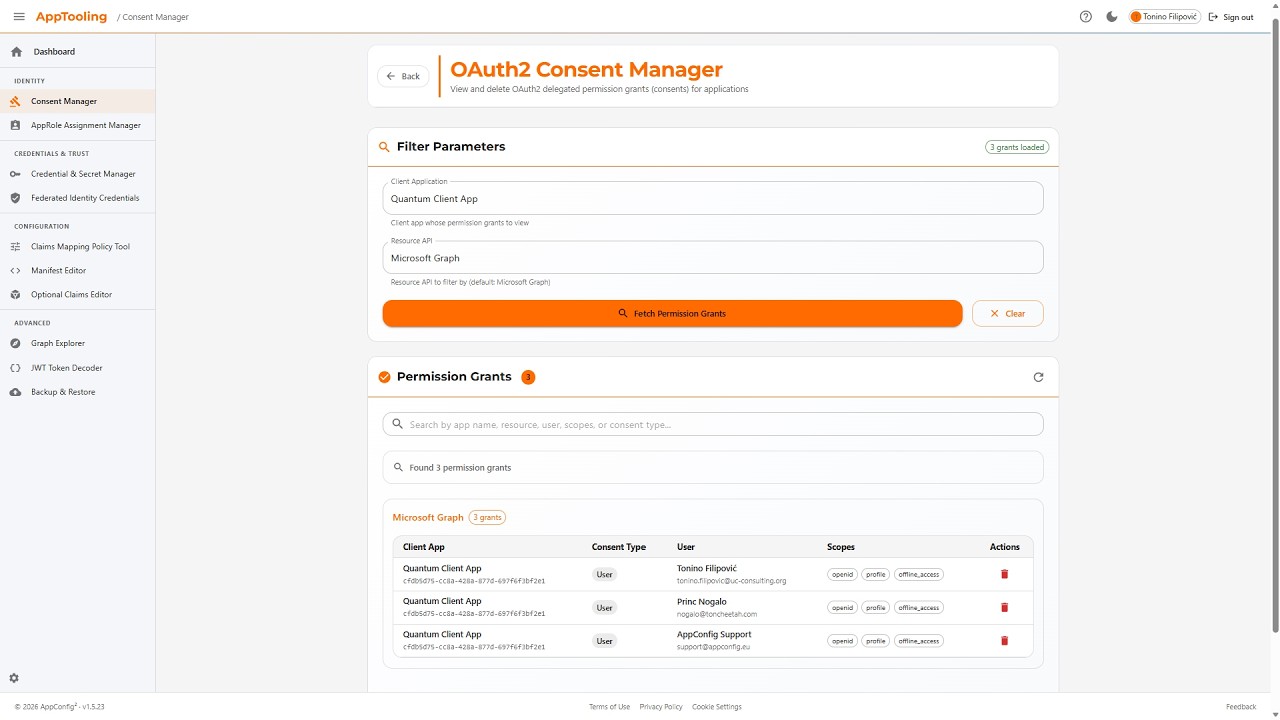
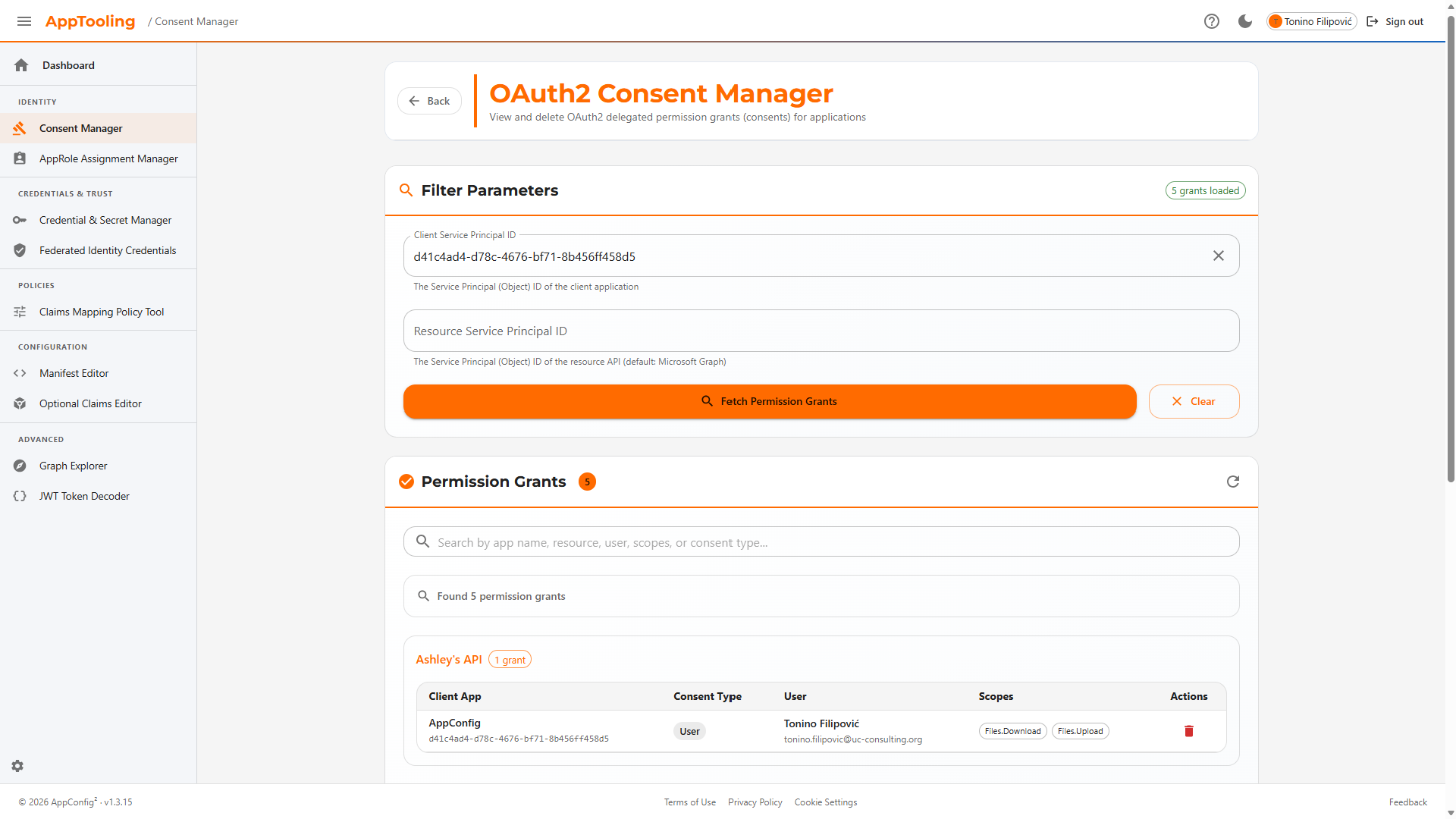
List all OAuth 2.0 delegated permission grants (OAuth2PermissionGrants) in the tenant. Filter by client or resource service principal. Revoke individual grants with a confirmation step. Distinguishes admin consent (AllPrincipals) from user consent (Principal) and surfaces the granting user's UPN.
AppRole Assignment Manager
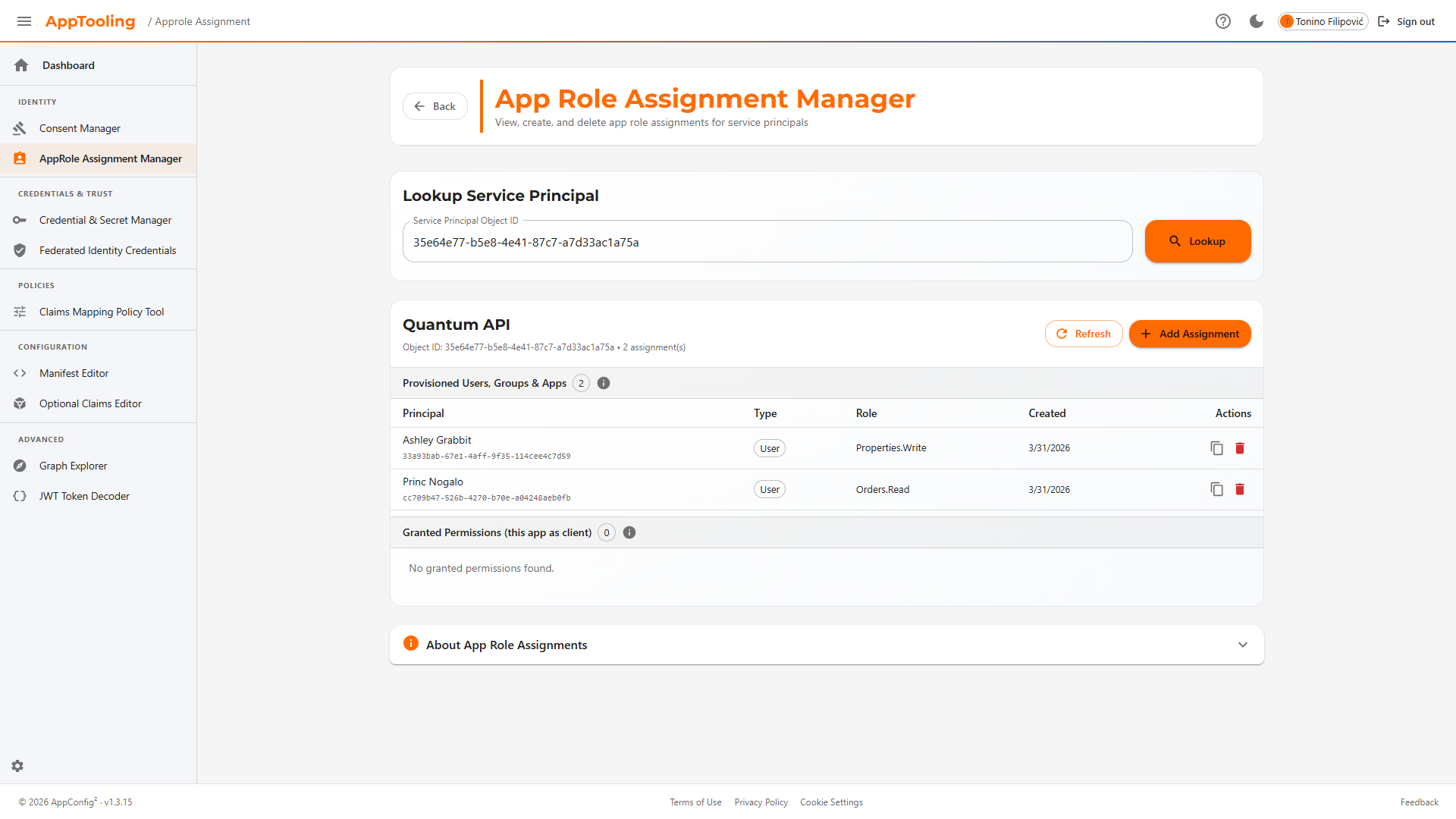
View app role assignments from both the principal's perspective (appRoleAssignments) and the resource's perspective (appRoleAssignedTo). Create new assignments by searching for service principals and selecting from their exposed app roles. Delete with confirmation.
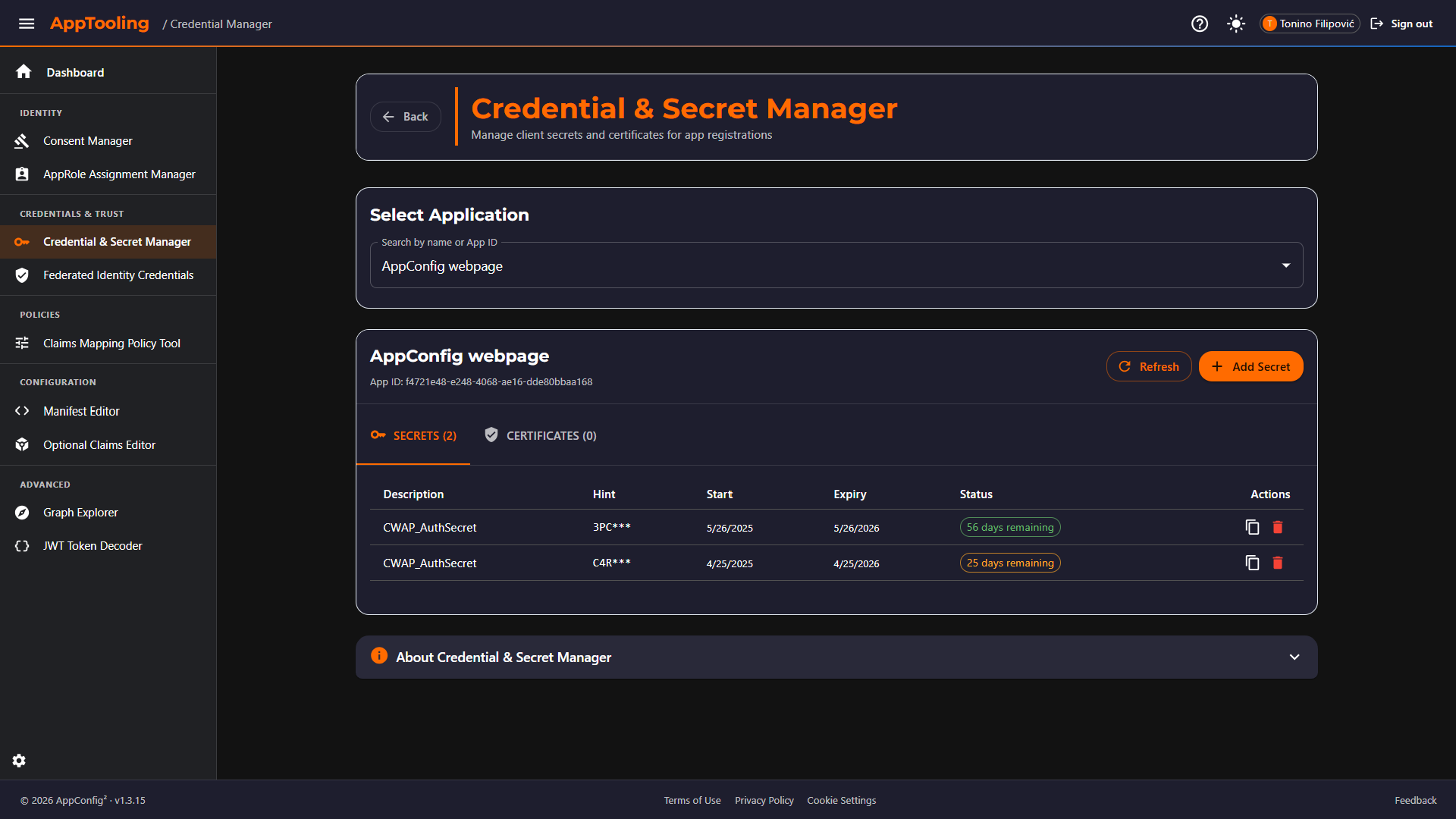
Credential & Secret Manager
Browse all client secrets and certificates across app registrations with colour-coded expiry status (configurable warning threshold). Create new secrets with configurable default lifetime. Certificates display thumbprint, type, and usage. New secret values are shown exactly once at creation.
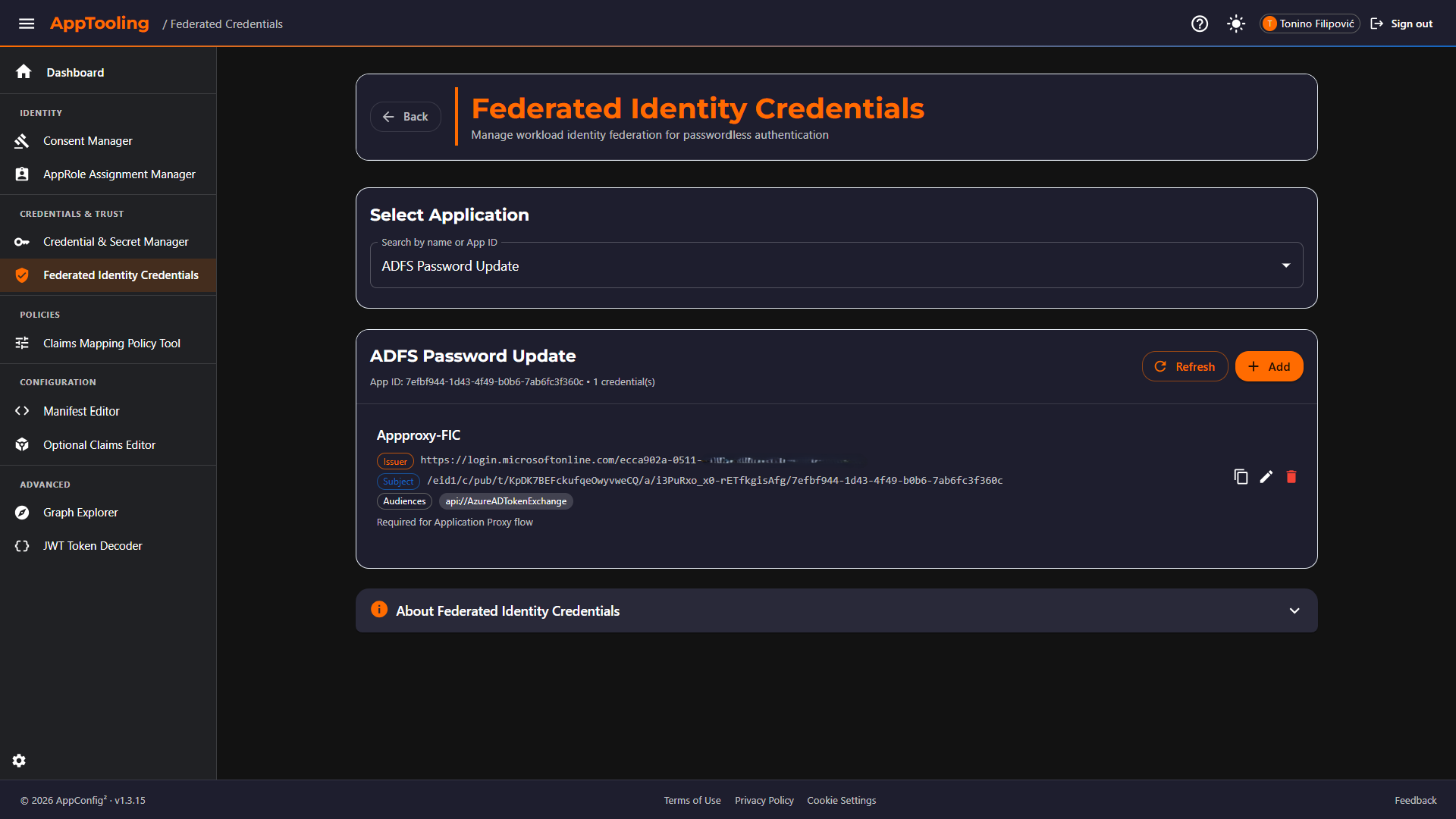
Federated Identity Credentials
Create and manage workload identity federation (WIF) credentials. Guided templates eliminate manual subject construction for the four most common issuers: GitHub Actions (branch / environment / PR), Azure DevOps, Kubernetes (service account), and Google Cloud. Custom issuers are also supported.
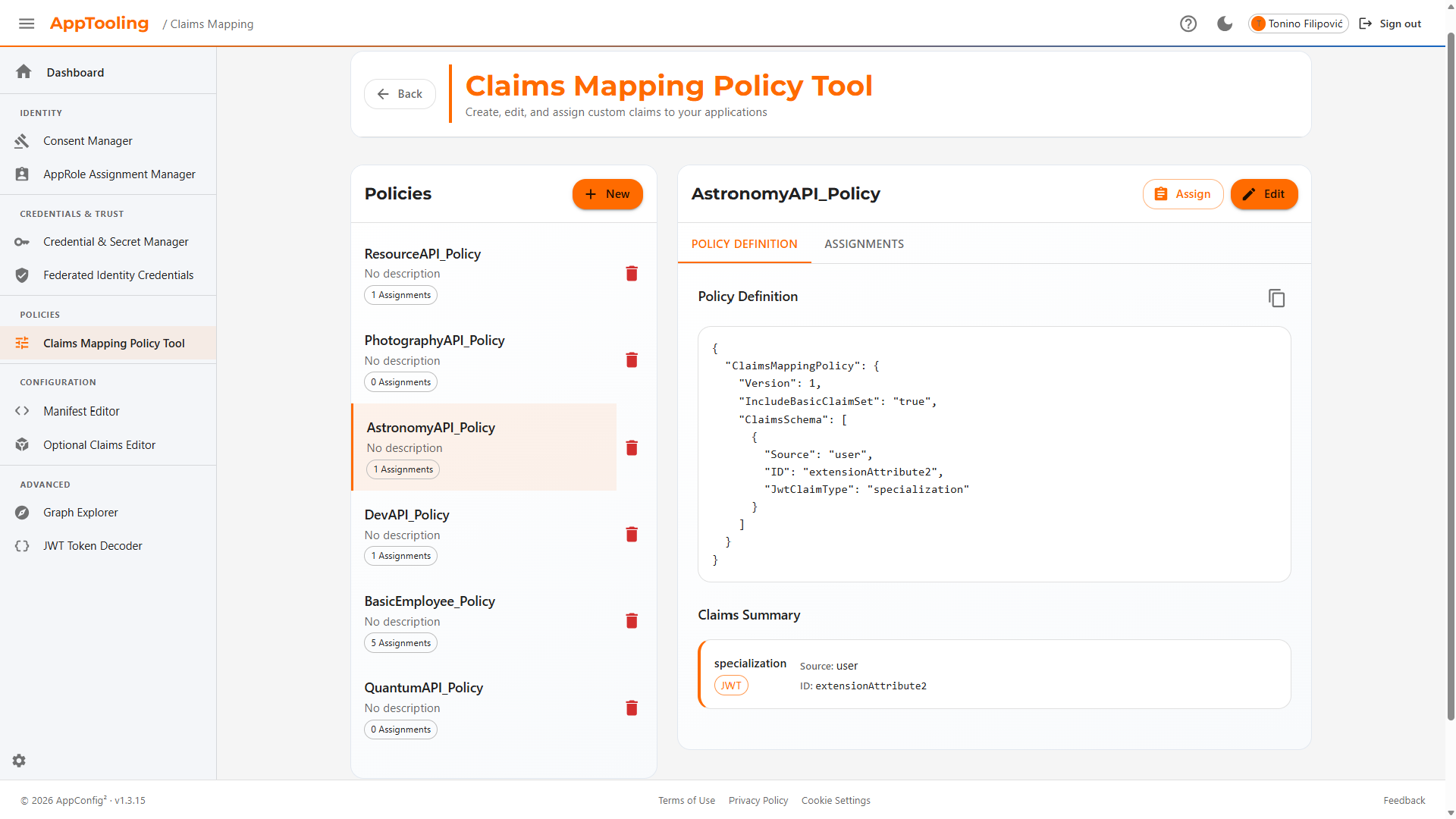
Claims Mapping Policy Tool
Full CRUD for claimsMappingPolicy objects. Built-in templates cover the most common customisations: department, employee ID, job title, extension attributes, group claims, and SAML name identifier. JSON editor with schema validation. Assign and unassign policies to service principals without leaving the tool.
Manifest Editor
Search any application registration and load its manifest in a syntax-highlighted JSON editor. Edit and save using Graph's JSON Merge Patch semantics. Displays app type chips (Web / SPA / Native / multi-tenant). Diff-detects unsaved changes and prompts before navigation.
Optional Claims Editor
Configure optionalClaims (ID token, access token, SAML2 token) through a structured UI backed by a curated claim catalog. Each claim includes a plain-language description, supported token types, and available additionalProperties. Changes are diffed against saved state and can be reverted before saving.
Graph Explorer
Execute arbitrary Microsoft Graph REST calls (GET / POST / PATCH / DELETE) against v1.0 or beta. Auto-detects required scopes per endpoint and triggers just-in-time consent. Syntax-highlighted JSON response panel with status code display. Built-in JWT decoder for the current session token. Common endpoint suggestions with scope hints.
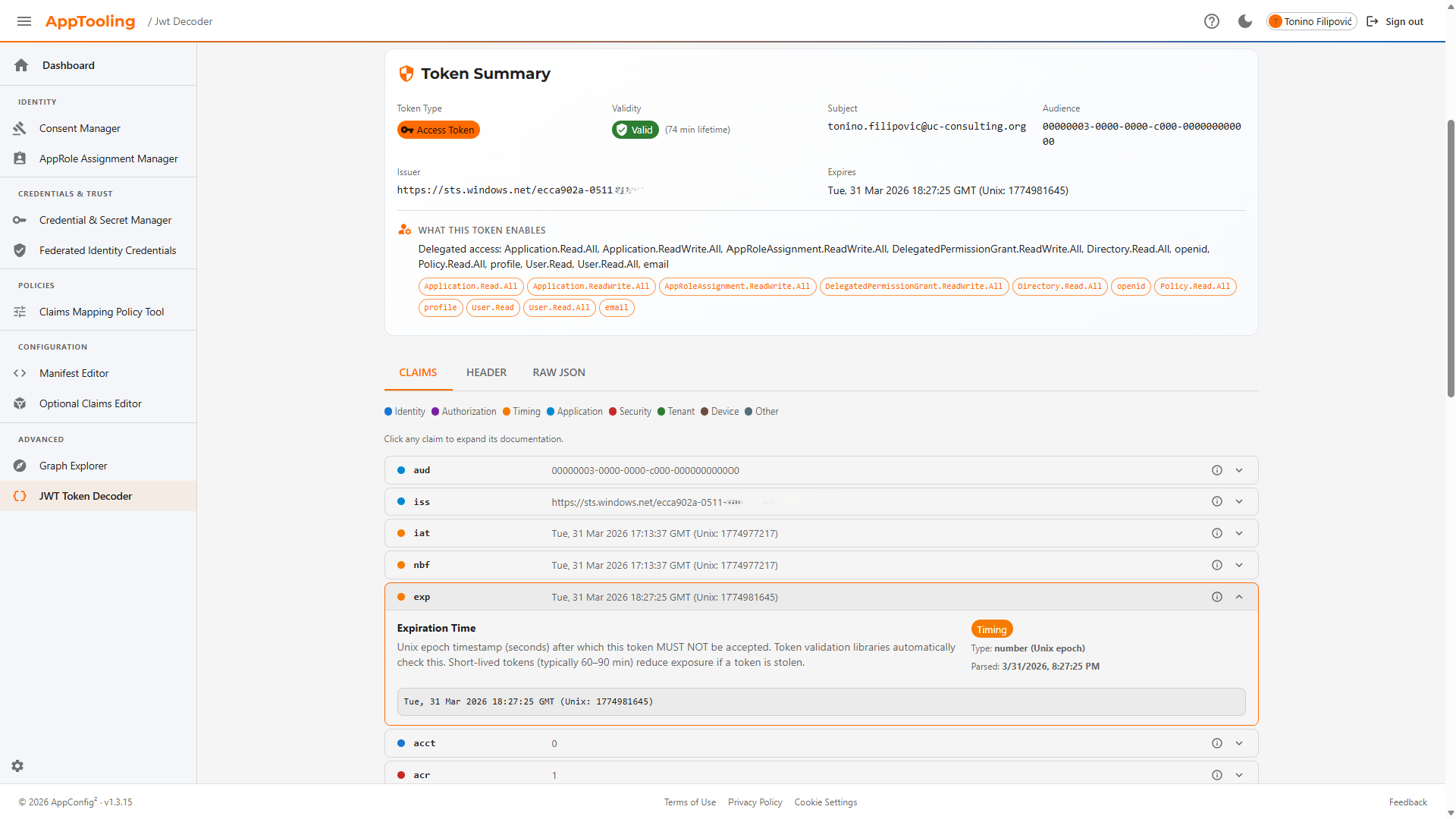
JWT Token Decoder
Paste any JWT (access token, ID token, or custom token) for a fully annotated breakdown. Auto-detects token type and validity (valid / expired / not-yet-valid). Token Summary shows type, expiry, subject, audience, issuer, lifetime in minutes, and a plain-English scope and app-role summary. Claims tab renders every claim with a colour-coded category dot (Identity, Authorization, Timing, Application, Security, Tenant, Device) — click any claim to expand its documentation and a Microsoft Docs link. Header and Raw JSON tabs also available. Decoding is entirely client-side; no Graph calls are made.
Backup & Restore
Safeguards entity configurations before write operations. Supports automatic backups (created silently by Manifest Editor, Claims Mapping Policy Tool, Consent Manager, and AppRole Assignment Manager before any mutation) and on-demand backups (manually triggered for any app registration or service principal). Covers four entity types: App Registration (full manifest snapshot), Service Principal Assignments (appRoleAssignedTo + appRoleAssignments), OAuth2 Permission Grants, and Claims Mapping Policy. Backups are stored in localStorage per tenant (max 2 snapshots per entity; 3 MB total cap with automatic LRU eviction). Each backup can be individually restored (with confirmation) or deleted. Credential backups preserve metadata only — secret values cannot be restored.
See AppTooling in Action
Watch the promo video, then browse screenshots of every tool
Screenshots — click to enlarge
Key Capabilities
Consent Lifecycle
List, filter, and revoke OAuth 2.0 delegated permission grants. See exactly which users granted consent and to which resources.
Workload Identity Federation
Guided templates for GitHub Actions, Azure DevOps, Kubernetes, and Google Cloud. Eliminate long-lived secrets for CI/CD and service workloads.
Manifest Editing
Load, edit, and save application manifests with a JSON Merge Patch workflow. Diff detection prevents accidental overwrites.
Optional Claims
Configure optional claims for ID, access, and SAML2 tokens through a structured UI with a curated catalog — no raw JSON required.
Credential Management
Browse client secrets and certificates across app registrations with expiry alerts. Create secrets with configurable lifetimes; values shown once only.
Claims Mapping Policies
Full CRUD for claimsMappingPolicy objects with built-in templates and SP assignment — without hand-editing JSON policy documents.
Backup & Restore
Automatic pre-mutation snapshots and on-demand backups for app registrations, service principal assignments, consent grants, and claims mapping policies — with one-click restore.
Who is AppTooling for?
Purpose-built for roles that need privileged Entra ID operations with guardrails.
Entra ID Admins
Day-to-day consent cleanup, role assignments, and credential rotation without navigating multiple Azure Portal blades.
DevSecOps Engineers
Configure workload identity federation for GitHub Actions, Azure DevOps, and Kubernetes — eliminating long-lived secrets from pipelines.
Identity Architects
Configure claims mapping policies and optional claims for custom token shapes without hand-editing raw JSON policy documents.
Developers
Inspect application manifests, test Graph API calls interactively with live JWT decoding, and validate optional claims behaviour end-to-end.
Security & Compliance
Audit and revoke OAuth consent grants. Monitor credential expiry across all app registrations. Evidence-based compliance reporting.
Cloud Architects
Design and validate token customisation strategies, workload identity trust chains, and application permission models at scale.
Security-First Design
AppTooling is a write-capable tool. Every security decision was made to prevent accidental or malicious misuse — without getting in the way of legitimate administration.
Authentication & Authorization
- Authorization Code Flow with PKCE — no implicit flow, no client secrets in the browser
- Tokens in sessionStorage — the MSAL session is isolated per browser tab and cleared when the tab closes
- Least-privilege scopes — each tool requests the narrowest Graph permission for its task
- JIT scope consent — Graph permissions are requested on demand per tool, not upfront
- Silent sign-out — uses the
login_hintoptional claim to avoid extra server round-trips
OWASP Client-Side Controls
- X-Frame-Options: DENY — blocks clickjacking attacks
- X-Content-Type-Options: nosniff — prevents MIME-type sniffing
- Referrer-Policy: strict-origin-when-cross-origin
- Security headers applied at SWA layer — via
staticwebapp.config.json
Write Operation Guardrails
- Confirmation dialogs on every write (DELETE / PATCH / POST) — no silent mutations
- Secrets shown once — new credential values are displayed immediately after creation and cannot be retrieved again
- No client-side secret storage — secret values are never persisted; access tokens are cached by MSAL in
sessionStorage(per-tab, neverlocalStorage). Non-sensitive Graph metadata caches (names, role definitions) are cleared on sign-out
Infrastructure & Data Residency
- Fully static SPA — no server-side code, no backend, no data processed outside Microsoft's infrastructure
- Azure Static Web Apps hosting — all requests go directly from the browser to Microsoft Graph
- No telemetry or third-party analytics beyond what Azure SWA platform collects
How AppTooling Fits the Suite
AppTooling is complementary to the other tools — it covers a distinct set of administrative operations not addressed elsewhere in the suite.
| Dimension | AppConfig | AppTesting | AppDashboard | AppTooling |
|---|---|---|---|---|
| Write capable? | — | — | ||
| Authentication flow testing | — | — | ||
| Tenant-wide analytics & security scoring | — | — | — | |
| Consent Manager (OAuth grant audit & revoke) | — | — | ||
| Workload Identity Federation / Federated Credentials | — | — | — | |
| AppRole Assignment Manager | — | — | ||
| Application Manifest Editor | — | — | ||
| Optional Claims Editor | — | — | ||
| Graph Explorer | — | |||
| Backup & Restore (auto + on-demand snapshots) | — | — |
Available Now — Choose Your Edition
AppTooling is live today as a multi-tenant SaaS app you can subscribe to immediately. Prefer a dedicated deployment in your own tenant? A single-tenant edition is available on request, and AppTooling is coming soon to Azure Marketplace.
Multi-Tenant SaaS
Your data stays in your Entra ID tenant — sign in with Microsoft and start in minutes
Single-Tenant Edition
Dedicated build deployed inside your own tenant — contact us for pricing
Azure Marketplace
Coming soon — native Azure billing alongside AppConfig & AppTesting
Professional Support
Dedicated technical support and documentation with every edition
AppTooling
€79 on a 2-year contract · €89 / month on a 1-year contract
- Full access to all administration tools
- Professional technical support
- Enterprise-grade security and compliance
- No setup fees or commitments
Need a dedicated single-tenant build?
Contact Us for Pricing Coming soon to Azure Marketplace with native Azure billingQuestions About AppTooling?
Want to learn more or report an issue? Our team is here to help.