AppConfig² Suite
Complete Microsoft Entra™ App Toolkit
Four purpose-built tools covering every angle of Microsoft Entra™ ID — authentication flows, tenant security, admin operations, and app configuration. Browser-based, MSAL PKCE-authenticated.
Without AppConfig² Suite:
Typical triage effort3+ hours per issue
- Install Fiddler, capture traffic, decode tokens manually — 3+ hours per issue
- No built-in token inspection or auth flow troubleshooting — diagnosing issues means reaching for external tools or writing custom scripts
- No tenant-wide visibility: credential expiry, risky permissions, and stale apps discovered reactively — after incidents
- Claims mapping and consent management require complex PowerShell or navigating multiple portal blades
With AppConfig² Suite:
Typical triage effortMinutes, not hours
- AppConfig: Safe configuration changes with auto-backup and one-click restore — minutes, not hours
- AppTesting: Read-only token decode, auth flow testing, and troubleshooting
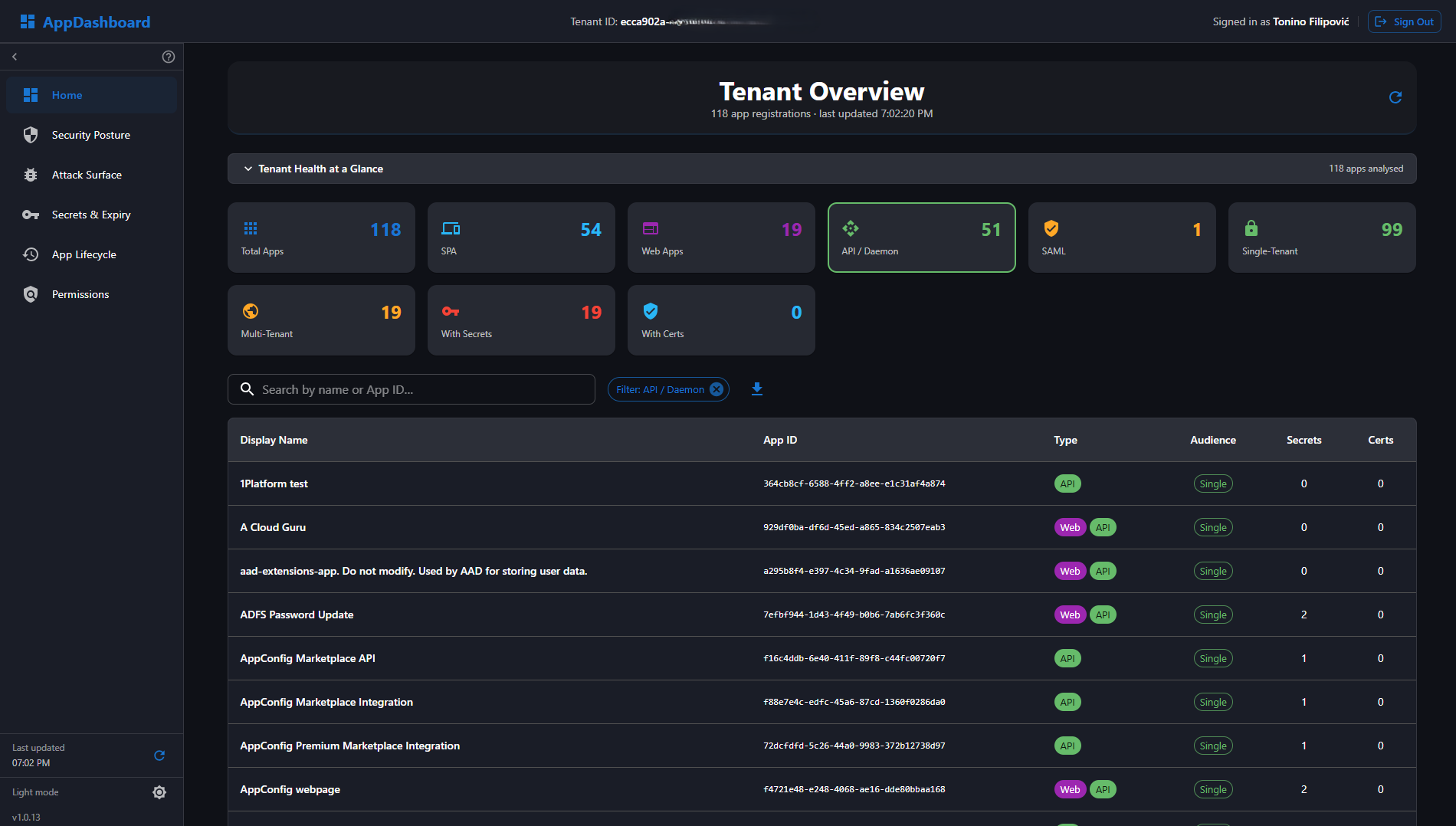
- AppDashboard: Tenant-wide security scorecard — expiring credentials, risky permissions, and attack surface at a glance
- AppTooling: Consent grants, claims mapping, and manifest edits — all admin operations in one place
Choose Your Tool
AppDashboard
Best For: Tenant-Wide Security Visibility
Tenant-wide security analytics for risk triage, governance reporting, and executive visibility.
- Tenant-wide app inventory & health scorecard
- Security posture
- Attack surface & risk-tier mapping
- Credential & secret expiry tracking
- Permission risk inventory
- AI agent identity blueprints recognised
Full details are available on on the AppDashboard page.
Already running Microsoft Defender for Cloud Apps? See how AppDashboard complements it →
Open AppDashboardAppConfig
Best For: Controlled Configuration Changes
Full lifecycle configuration management with guarded writes and rollback safety.
- Includes all AppTesting features, plus:
- Modify app configurations
- Automatic backup & restore
- Claims mapping policies
- App role management
See full capability coverage on the AppConfig page.
Explore AppConfigAppTesting
Best For: Read-Only Diagnostics
Read-only troubleshooting and token diagnostics for controlled production environments.
- Authentication flow testing
- Token decoding & analysis
- Permission analysis
- Conditional access insights
Full details are available on the AppTesting page.
Explore AppTestingAppTooling
Best For: Entra Admin Operations
Admin operations toolkit for consent, identities, manifests, and credential lifecycle tasks.
- Consent Manager — audit & revoke OAuth grants
- AppRole Assignment Manager
- Credential & Secret Manager per app
- Federated Identity Credentials (Workload Identity)
- Claims Mapping Policy CRUD
The full ten-tool catalog is available on the AppTooling page.
Explore AppToolingWho is AppConfig² Suite for?
Each tool is purpose-built for the roles that need it most.
IT Managers
Executive-level health scorecards, at-risk app counts, and exportable governance reports.
Security Engineers
Analyze security posture, attack surface exposure, and permission risks across the tenant.
Tenant Managers
Full app inventory, ownership gaps, audience exposure analysis, and multi-tenant visibility.
L3 Support
Troubleshoot complex application issues with comprehensive analysis and token inspection tools.
Developers
Test OAuth2/OIDC flows, validate claims mappings, and verify Entra ID integrations end-to-end.
IT Admins
Manage app registrations, track credentials, configure permissions, and access portal deep-links.
Entra ID Admins
Perform consent cleanup, role assignments, and credential rotation without navigating multiple Azure Portal blades.
DevSecOps Engineers
Configure workload identity federation for GitHub Actions, Azure DevOps, and Kubernetes — no long-lived secrets required.
Identity Architects
Configure claims mapping policies and optional claims for custom token shapes without hand-editing raw JSON manifests.
Security & Compliance
Audit and revoke OAuth consent grants; monitor credential expiry across all app registrations in the tenant.
Key Capabilities
End-to-End Testing
Test OAuth2/OIDC flows with automatic token capture and real-time claims analysis.
Claims Management
Create and test claims mapping policies with instant token verification.
Safe Configuration
Modify app settings with automatic backups and one-click restore (AppConfig only).
Graph Integration
Embedded Microsoft Graph Explorer for advanced queries and troubleshooting.
Permission Review
View configured API permissions, delegated scopes, and conditional access policies for single-app troubleshooting.
Role Management
Complete app role and permission lifecycle management in one interface.
One Suite. One Foundation. Four Tools.
Every tool in the AppConfig² Suite is built on the same architecture and security principles, all targeting Microsoft Entra™ ID app registrations through the Microsoft Graph API.
Microsoft Entra™ ID Apps
All tools operate on Entra ID app registrations and service principals in your tenant, queried through the Microsoft Graph API. Your data never leaves your Microsoft tenant.
MSAL PKCE Authentication
All tools authenticate via MSAL (OAuth) Authorization Code Flow with PKCE — no implicit flow, no client secrets stored in the browser. Sessions are isolated per tab using sessionStorage.
Azure Static Web Apps
All tools are hosted on Azure Static Web Apps. AppConfig and AppTesting additionally include an Azure Functions backend component to support client credentials flow testing and confidential client scenarios. No data is processed or stored outside your Microsoft tenant.
AppConfig² Suite – Tool Comparison
See which capabilities are available across each tool.
AppConfig
Full management, safe writes, and rollback-ready lifecycle operations.
AppTesting
Read-only flow testing and token analysis in controlled environments.
AppDashboard
Tenant analytics, risk posture, and executive security score visibility.
AppTooling
Focused admin operations for consent, manifests, identity, and credentials.
| Capability | AppConfig | AppTesting | AppDashboard | AppTooling |
|---|---|---|---|---|
| Analysis & Testing | ||||
| Authentication Flow Testing | — | — | ||
| Token Analysis & Decoding | — | |||
| Permission & Scope Review | — | — | ||
| Graph Explorer & OData Queries | — | |||
| Service Principal Overview | — | — | ||
| Certificate Monitoring | — | — | — | |
| Configuration Management | ||||
| App Configuration & Redirect URI Management | — | — | — | |
| App Roles & User Provisioning | — | — | ||
| Claims Mapping & Client Secret Management | — | — | ||
| Backup & Restore | — | — | ||
| Lifecycle Management | — | — | — | |
| Tenant Analytics & Security Visibility | ||||
| Tenant-Wide App Inventory | — | |||
| Health Scorecard & Security Alerts | — | — | — | |
| Security Posture, Risk Tiers & Attack Surface Mapping | — | — | — | |
| Credential Expiry Tracking & Permission Risk Inventory | — | — | — | |
| Entra ID Admin Operations | ||||
| Consent Manager & AppRole Assignment | — | — | ||
| Credential & Secret Manager (per App Registration) | — | — | ||
| Federated Identity Credentials (Workload Identity Federation) | — | — | — | |
| Claims Mapping Policy, Manifest & Optional Claims Editor | — | — | ||
What IAM Teams Are Saying
Used in production by identity and security practitioners across industries.
I had no idea how many stale app registrations were silently accumulating risky permissions over the years. AppDashboard surfaced the full picture in minutes — the attack surface view alone made the subscription worth it for our security team.
We had a claims mapping issue where a token was missing a required role claim in one environment but not another. AppTesting let us fetch, decode and analyze both tokens side by side and spot the discrepancy in minutes — without Fiddler or custom scripts.
Our team used to spend a full sprint every quarter compiling the credential expiry report for our app portfolio. AppDashboard turned that into a five-minute review. The executive scorecard actually surprised our CISO — in a good way.
Testimonials are representative of real user feedback. Names and company details are anonymized pending formal consent.
Simple, Transparent Pricing
Every tool starts with a 1-month free trial — no setup fees, cancel anytime. AppConfig and AppTesting are billed natively through Azure Marketplace, AppTooling is a direct multi-tenant SaaS subscription, and AppDashboard is available either way.
Flat per-tenant pricing — unlimited admins and users, no per-seat fees.
AppConfig
Azure Marketplace
Then pay-as-you-go with Azure-native billing. Full configuration management with guarded writes.
View on Azure MarketplaceAppTesting
Azure Marketplace
Then pay-as-you-go with Azure-native billing. Read-only diagnostics and token analysis.
View on Azure MarketplaceAppDashboard
Multi-tenant SaaS
1-month free trial included. Tenant-wide security analytics and governance reporting.
See AppDashboard PricingAppTooling
Multi-tenant SaaS
1-month free trial included. Entra ID admin operations and credential lifecycle toolkit.
See AppTooling Pricing- Azure-native billing
- Enterprise-grade security & compliance
- No commitments — cancel anytime
- Professional support included
Built by Identity Practitioners, for Identity Teams
AppConfig² is built by identity practitioners with enterprise authentication experience from Kerberos to OpenID Connect. We convert field-proven IAM practices into tools that keep testing, troubleshooting, and configuration precise, safe, and repeatable.
Practitioner-Built
By IAM experts for IAM teams
Security-First
Safe testing with automatic backups
Continuously Improved
Regular updates based on feedback
Enterprise Ready
Scalable for complex organizations
Need Help? Contact Support
Questions, production issues, or roadmap feedback? Our team is here to help.